


Physicians Cancer Chemotherapy
4.78.00 Reviews
App Specs
- Version
- 2.3.1.156
- Updated On
- License
- Free
- Downloads
- 10,000+
- Developer
- AtmosphereApps
- Categories
- Medical
- Platform
- Android
Screenshots
 Analysis by AppCompare
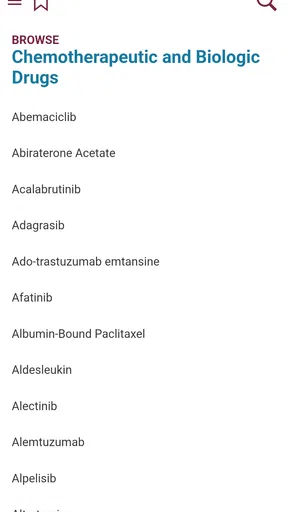
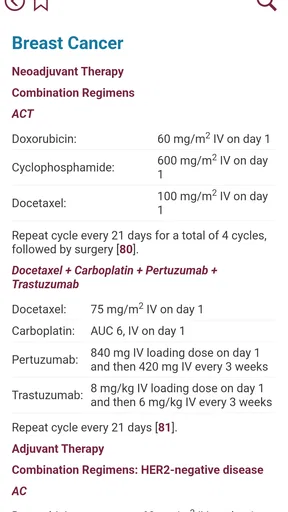
When I opened Physicians Cancer Chemotherapy, I approached it as a reference tool rather than a general health app. Its purpose is narrow and clear: it focuses on chemotherapy information connected with major cancers. That focus can be useful when I need to orient myself around a treatment term, compare the way a drug is discussed across cancer types, or prepare better questions before speaking with an oncology professional.
I want to be clear about how I see it. This is not an app I would use to choose a medicine, adjust a dose, interpret a symptom, or replace a consultation. Cancer treatment depends on details that a quick reference cannot fully capture, including diagnosis, stage, previous treatment, laboratory results, other medicines, and the patient’s general condition. For me, the value is in having a compact starting point for learning, not in turning a phone into a prescribing tool.
The app comes from AtmosphereApps and is listed as a free medical app for everyone. It has built a 4.7 average from around 155 ratings, with more than 10K installs, which suggests that it has found a modest but interested audience. It was released on May 23, 2018, and the current version is 2.3.1.156. Those details matter because this feels more like a focused reference utility than a large, constantly evolving patient platform.
How the app feels during ordinary searches
When I use a focused chemotherapy reference, I find it helps to begin with the exact term I heard rather than browse broadly and risk collecting fragments without context. I pay attention to whether a search gives me enough orientation to frame a useful follow-up, while keeping clinical decisions with the care team. That practical distinction also leads me to consider what I can—and cannot—verify about the app’s controls.
Speed expectations before deeper reading
My first impression is that this type of app should be judged by how quickly it lets me reach useful information, not by how many visual effects or extra services it offers. A chemotherapy guide has one important job: reduce the time between remembering a treatment name and finding a sensible explanation of where it fits. In that role, a focused layout can be more helpful than a broad medical app filled with unrelated subjects.
I would use it in short sessions. For example, if a family member mentions a drug during an appointment, I might make a note of the name and consult the guide later when I have a quiet moment. The best workflow is to treat the result as orientation: identify the medicine or cancer area, read carefully, and then write down questions for the care team. I would not rush through a page and assume that a familiar drug name means the same treatment plan applies to everyone.
The app’s narrow subject should also help keep searches mentally manageable. Instead of moving through a general encyclopedia that covers every medical specialty, I can stay inside the chemotherapy context. That makes it easier to concentrate, especially when I am already dealing with unfamiliar terminology. The trade-off is that a narrow tool is less useful when my question moves beyond cancer medicines into nutrition, imaging, surgery, emotional support, or detailed symptom management.
Worth Reading Before You Choose

EA SPORTS FC Mobile 26 Is a Bigger Football Game, but It Takes Time

Flipboard Shows What News Apps Must Do Beyond the Feed

Switching to Android Auto Means Rethinking Your Driving Routine

Google Calendar Makes a Crowded Week Easier to Manage

Ludo King Makes the Most of the Minutes Between Plans

Baby Panda World Brings Quick Play to Modern Phones, but Its Game Library Feels Busy
What I would do in a heavy-use moment
The most demanding use case is not casual browsing. It is the moment when several treatment names, cancer types, and clinical terms appear together and I need to keep them organized. I would avoid opening the app in the middle of a stressful appointment and trying to make immediate decisions from it. A better approach is to use it afterward, when I can check one topic at a time and compare what I read with the notes given by the oncology team.
One practical habit is to keep a separate question list. If the guide introduces an unfamiliar term, I would record the term, the context in which it appeared, and what I still do not understand. That prevents the app from becoming a source of rushed conclusions. It also makes a later appointment more productive because I can ask a specific question instead of saying only that I am confused about chemotherapy.
Another useful scenario is study or professional preparation. A student, caregiver, or healthcare worker who needs a compact refresher may appreciate having cancer treatment information grouped in one place. Even then, I would use it alongside formal textbooks, current clinical guidance, and professional education. The app works best as a convenient reference layer, not as the only source for a high-stakes decision.
Stability and trust during repeated use
For a medical reference, reliability has two meanings. The first is technical: the app should open, respond, and let me return to the subject I was reading without unnecessary friction. The second is informational: the content must be handled cautiously because a reader may treat a confident-looking paragraph as personal medical advice. The second concern is more important than a polished interface.
I would therefore pay attention to how clearly the app separates general drug information from individual treatment guidance. A useful reference should encourage verification with a qualified professional, particularly when the reader is considering side effects, interactions, dose changes, or whether a treatment is appropriate. I would not interpret a simple entry as confirmation that a medicine is suitable for a particular patient.
The app’s rating indicates that many users have found it worthwhile, but a rating cannot establish clinical completeness or currentness on its own. Cancer treatment changes, and even accurate general information can become incomplete when recommendations evolve. My own rule would be simple: use the app to understand vocabulary and prepare questions, then confirm treatment decisions through the patient’s oncology team and current medical sources.
That approach also protects against a common misunderstanding. A guide about chemotherapy is not automatically a personal medication checker. If I were worried about a new symptom, a possible interaction, or a missed treatment, I would contact the relevant healthcare service rather than waiting for an app search to settle the issue.
Device limits and practical constraints
The minimum operating system is Android 8.0, so compatibility is relatively broad for many Android phones, but it still excludes devices that cannot run that version. Before planning to rely on it, I would check the phone’s operating system and make sure the app can be installed and opened comfortably. A reference tool is only useful when it is available on the device I actually carry.
Screen size can also change the experience. On a small phone, long medical passages may require frequent scrolling, and that can make it harder to compare two concepts or return to a particular term. I would read slowly and use the phone’s normal text and display settings if needed. Someone who prefers large print, strong accessibility controls, or a highly visual learning format may be more comfortable with a different medical resource.
Storage and battery demands are difficult to judge from the basic listing alone, so I would not choose this app on the assumption that it is especially light or especially demanding. In normal use, a text-focused reference would generally be more suitable for short reading sessions than for continuous background activity, but my recommendation is still to try it on the intended phone before depending on it during travel or an appointment.
The pricing model deserves attention as well. The app is free to install, while in-app purchases are listed at $39.99 per item. That means I would inspect the purchase prompt carefully before confirming anything and would not assume that every part of the experience is included at no cost. For a medical reference, understanding what is available freely and what may require a purchase is part of deciding whether it fits my budget and needs.
Where it fits beside usual alternatives
Compared with a general web search, this app offers a more focused starting point. A web search can return hospital pages, patient organizations, discussion forums, advertisements, and outdated material all at once. That variety can be useful, but it also creates more work because I have to judge which sources deserve trust. A dedicated chemotherapy guide may feel calmer when I want to begin with the treatment subject itself.
Compared with an official hospital or cancer organization resource, the app is less likely to be my final authority. Official resources often provide broader patient guidance, contact routes, explanations of appointments, and material written for specific care settings. I would turn to those sources when I need current patient instructions or a clear explanation of what to do next. I would use this app when I want a compact reference that helps me understand the language before reading more widely.
Compared with a drug database, its cancer-centered purpose may be an advantage for oncology-related browsing. A broad drug database can be stronger for checking general interactions, formulations, or medication details across many conditions, while this app is more relevant when my question begins with cancer chemotherapy. Neither type should be used as a substitute for a pharmacist or oncologist when the question concerns an actual prescription.
There is also a difference between this tool and a treatment-tracking app. A tracker may help record appointments, symptoms, or medicines taken, but that is not the role I would assign here. I would not expect it to organize my personal care routine simply because it contains treatment information. Choosing the right category matters: reference reading and personal monitoring solve different problems.
Three ways I would use it more intelligently
First, I would search before an appointment rather than during a tense conversation. I could identify unfamiliar terms, note the questions they raise, and then let the clinician explain how they apply to the individual case. This turns the app into a preparation aid and reduces the temptation to make an immediate decision from a short entry.
Second, I would check the full context around a treatment name instead of stopping at the first familiar word. Drug names can appear in different treatment discussions, and a general description does not tell me whether a specific regimen, schedule, or combination is appropriate. Reading the surrounding material helps me understand the subject without confusing general information with a personal recommendation.
Third, I would treat any purchase option as a deliberate choice. Since individual in-app items are listed at $39.99, I would first decide whether the extra material solves a real problem for me, then verify what the purchase covers before paying. For occasional patient reading, a free official cancer resource may be better value; for repeated study, a paid reference could make more sense if its scope meets my needs.
A fourth habit is especially important for caregivers. I would keep the patient’s own care instructions separate from anything I read in the app. If the guide and the care team appear to differ, I would not try to resolve the conflict by choosing the more convenient answer. I would show the relevant passage to the clinician or pharmacist and ask for clarification.
Who will find it useful, and who should skip it
I can recommend it to readers who want a compact introduction to chemotherapy terminology, caregivers preparing for conversations with an oncology team, and learners looking for a cancer-focused reference on an Android device that meets the operating-system requirement. Its subject focus is its strongest quality: it avoids pretending to be an all-purpose health companion.
I would be more cautious about recommending it to someone who wants personalized treatment instructions, detailed interaction checking, symptom triage, appointment management, or a complete cancer-care plan. Those needs call for different tools and, in several cases, direct professional support. I would also skip it as a primary resource if I needed strong accessibility features, a broader patient-support experience, or a clearly integrated way to record personal medical information.
People who are currently frightened by a new symptom should be especially careful. Reading about chemotherapy can increase anxiety when the information is taken out of context. In that situation, I would contact the treatment team or an appropriate medical service first and use the app later, once I have a safe framework for understanding what I am reading.
My performance verdict after weighing the trade-offs
Physicians Cancer Chemotherapy makes the most sense as a focused reference, not as a complete medical companion. Its free entry point, cancer-specific subject, and straightforward purpose make it easy to consider for quick background reading. The 4.7 average and more than 10K installs show that it has attracted real interest, although popularity should not be mistaken for a guarantee that every reader will find the scope sufficient.
From a performance perspective, I would expect the best experience during short, purposeful sessions: look up a term, read enough to understand the context, write down a question, and move on to a trusted professional source. Heavy multitasking, urgent symptom decisions, or long study sessions may expose the limits of a compact phone reference more quickly. The Android 8.0 requirement is reasonable for many users, but device comfort and the purchase structure still deserve a check before relying on it.
My final recommendation is therefore conditional but positive. If you want a chemotherapy-centered starting point and understand that it is educational rather than personal medical advice, this app is worth trying. I would keep it alongside official cancer information and the guidance of the patient’s care team. The smartest way to use this app is as a question-building tool, not as a treatment decision-maker. That distinction gives it a useful place in my medical-information routine while keeping its limitations in view.
Pros
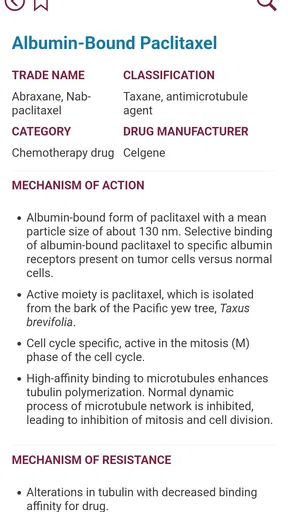
- Provides quick access to chemotherapy drug information.
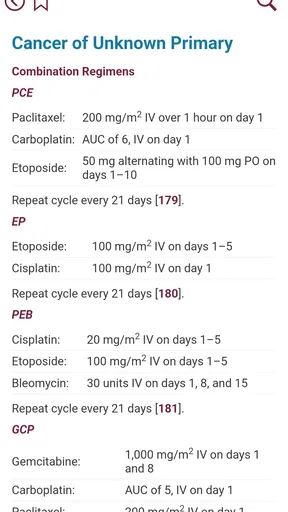
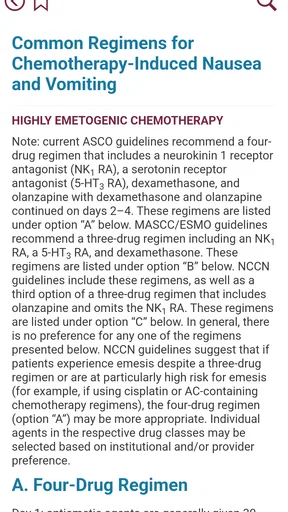
- Useful reference for reviewing treatment protocols and regimens.
- Helps clarify common oncology terminology and abbreviations.
- Compact format makes information easy to consult during clinical work.
- Can support study and revision for healthcare students.
Cons
- Should not replace guidance from an oncologist or qualified healthcare professional.
- Content may require updates as cancer treatment guidelines change.
- Some information may be difficult for patients without medical knowledge.
- Drug details may not reflect local approvals or prescribing practices.
- Limited value for users seeking personalized treatment recommendations.
FAQs for Physicians Cancer Chemotherapy
What is Physicians Cancer Chemotherapy?
Physicians Cancer Chemotherapy is a medical reference app designed to help healthcare professionals review information related to cancer chemotherapy. It may include drug details, treatment protocols, dosage references, administration guidance, adverse effects, and monitoring considerations. The app is intended as a quick clinical aid rather than a replacement for oncology training, institutional policies, official prescribing information, or professional judgment.
Who should use Physicians Cancer Chemotherapy?
This app is primarily intended for physicians, oncologists, pharmacists, nurses, medical students, and other trained healthcare professionals involved in cancer treatment. Because chemotherapy decisions depend on the cancer type, treatment intent, laboratory results, organ function, concurrent medicines, and patient-specific factors, it is not designed for self-diagnosis or for patients to choose or adjust treatment without direct medical supervision.
Can the app be used to calculate chemotherapy doses?
The app may provide dosing information, regimen references, or calculation support, depending on the version and available features. However, users should never rely on an app alone to determine or administer chemotherapy. Doses must be independently verified against current guidelines, the patient’s diagnosis, body measurements, laboratory results, renal and hepatic function, treatment cycle, and local oncology protocols before any medication is prescribed or given.
Is the information in Physicians Cancer Chemotherapy always current and medically approved?
Medical oncology guidance changes as new evidence, medicines, safety warnings, and treatment protocols become available. Before using information from Physicians Cancer Chemotherapy in clinical practice, check the app’s update date, references, and publisher details, then compare the content with current regulatory documents, peer-reviewed guidelines, and your institution’s approved protocols. If information conflicts, follow authoritative and locally approved sources.
Does Physicians Cancer Chemotherapy replace advice from an oncologist or pharmacist?
No. Physicians Cancer Chemotherapy should be treated as an educational or point-of-care reference, not as a substitute for consultation with a qualified oncology team. Chemotherapy can cause serious or life-threatening complications, including infection, organ toxicity, severe allergic reactions, and dangerous drug interactions. Patients and caregivers should discuss all treatment questions with their oncologist, pharmacist, or other responsible healthcare professional.


